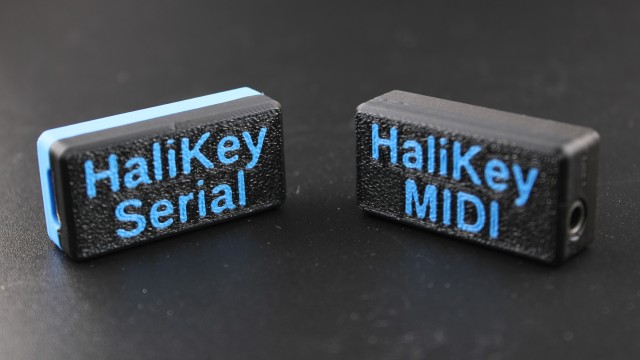
Halibut Electronics is proud to announce the re-release of the serial-port based HaliKey v1, renamed to HaliKey Serial to more clearly differentiate it from HaliKey MIDI.
Click Here to buy HaliKey, both types.
Both variations of HaliKey allow you to connect your morse code paddles, or PTT switch, to a computer for remote operation:
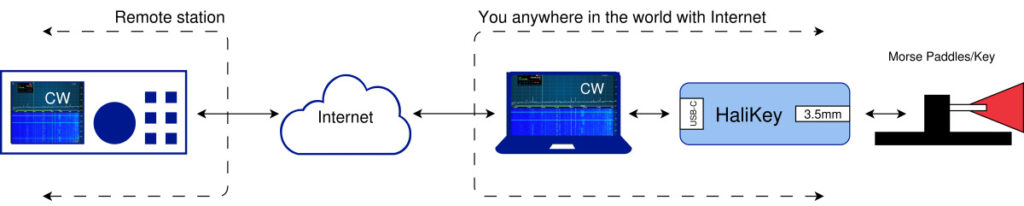
Some software on your computer expects a serial port and flow control signals, and other software expects MIDI Note On/Off events. Each variant of HaliKey works with the relevant software.
HaliKey Serial uses serial flow control signals like CTS and DSR.
HaliKey MIDI uses MIDI Note On/Note Off events.
Here’s a table of the applications I know about (as of 2026-03-23), and which ones support which HaliKeys:
| Software: | OS Platform | Radio Platform | HaliKey MIDI | HaliKey Serial |
| Flex Radio SmartSDR | Windows | Flex Radio | No. Use NetKeyer instead. | PTT Only. Use NetKeyer for Morse. |
| SmartSDR | MacOS, iOS | Flex Radio | Yes | Yes (MacOS only) |
| SDR-Control | MacOS, iOS | Icom | Yes | Yes (MacOS only) |
| K4-Control | MacOS, iOS | Elecraft | Yes | Yes (MacOS only) |
| YT-Control | MacOS, iOS | Yaesu | Yes | Yes (MacOS only) |
| TS-Control | MacOS, iOS | Kenwood | Yes | Yes (MacOS only) |
| NetKeyer | Win, MacOS, Linux, R-Pi | Flex Radio | Yes | Yes |
| Remote Ham Radio | Web Browser | Proprietary radio network | Yes | No |
| Software Defined Connectors (SDC) | Win, MacOS | All. Radio agnostic. | Yes | Yes |
| QK4 | Win, MacOS, R-Pi | Elecraft | Yes | Yes |
| CW Simon | Web Browser | CW Training | No | Yes |
If you know of another application that should be in this table, please let me know.
Note that the new HaliKey Serial is exactly the same hardware as HaliKey v1, but with a hard plastic case instead of the blue heatshrink that v1 came in.

Remote Reply
Original Comment URL
Your Profile
Why do I need to enter my profile?
This site is part of the ⁂ open social web, a network of interconnected social platforms (like Mastodon, Pixelfed, Friendica, and others). Unlike centralized social media, your account lives on a platform of your choice, and you can interact with people across different platforms.
By entering your profile, we can send you to your account where you can complete this action.
@mark you could have done the funniest cursed thing and had one pair of the USB-C do serial and one do MIDI.
Mark, thanks for bringing back serial support! The spiffy new packaging looks cool. What precipitated the change in packaging?
I always wanted something a bit more sturdy than the heat shrink. Once I got a 3D printer capable of doing production quality prints, I spent some time learning FreeCAD and came up with something I’m really happy with. I started using the new case with HaliKey MIDI. Once I brought HaliKey v1 back as HaliKey Serial, I decided to make it a plastic case too.
Hi Mark,
Like the new packaging. Did the issue you have with the M4 Macs recognizing the HaliKey get resolved? Wondering if the M5 Macs have this issue?
Yes it did! If you have a HaliKey that does not work on an M4, please go to https://electronics.halibut.com/halikey-flasher/ and follow the process there to update the firmware.
Short version: I had debugging turned on for development, that collected a bunch of data in timing critical parts of the code, causing the USB stack on HaliKey to take longer than the M4 is willing to wait around. All other OS’s and hardware we could find didn’t have a problem with it, including M1 Mac’s on the same OS. And, more importantly, all the computers I was using for testing. I now have an M4 Mac for testing. 🙂
The solution was to turn off debug data collection for production builds. Bob is now my uncle. (His name was Hap, but that’s not how the saying goes.)